Skip to content
Matheus Prates

Time in Goiânia: Goiânia

PTRésumé

I put systems into production. And I stick around after they go live.

Full stack developer and DevOps engineer in Goiânia, Brazil.

Open to remote or hybrid roles

Portrait of Matheus Prates in a black shirt

Matheus Prates

Full stackDevOpsFrom server to app

I left Pará when I was 16.

I moved to Goiânia looking for a chance. I started with whatever came up: computers, networks and a lot of printers.

1,706km by road

ParáGoiânia

I learned from the ground up.

From first-line support to shipping products to production, in two years.

  1. IT Intern

    Rede JS Peças · Sep 2024 to Feb 2025

    First-line support: hardware, operating systems and the good old "have you tried turning it off and on again?".

  2. Infrastructure Trainee

    Rede JS Peças · Feb to Jul 2025

    Server and network monitoring with Zabbix, information security and compliance with LGPD, Brazil's data protection law.

    This is where I wrote my first script to make printers unjam themselves.

  3. Infrastructure Technician

    Dimex · Jul to Dec 2025

    Field support across the state of Goiás: schools, clinics, factories and co-ops. Servers, networks, thermal printers and interactive displays.

  4. DevOps and development

    Mentor, AI consultancy · since Jan 2026

    Production Linux servers with Docker and K3s, plus systems for clients: income tax software that reads and writes the Federal Revenue file format, bank reconciliation over Open Finance and bank integration over mTLS.

    AI stopped being a topic and became a work tool.

  5. Development and infrastructure

    Pratech Solutions, client · since Jul 2026

    I provide development and infrastructure services: products, apps and the servers they run on. Much of what is right below came out of that work.

  6. Education

    • B.Sc. in Computer Science at Universidade Anhembi Morumbi, in progress, expected 2027
    • Oracle Cloud Infrastructure 2025 Foundations Associate
    • Courses in Linux, networking, DevOps and cloud (AWS, Azure and Google Cloud)

What I built.

Almost everything below runs every day, on servers I look after myself.

01Busca Vagas

Tech jobs in Goiânia and remote ones, in one place.

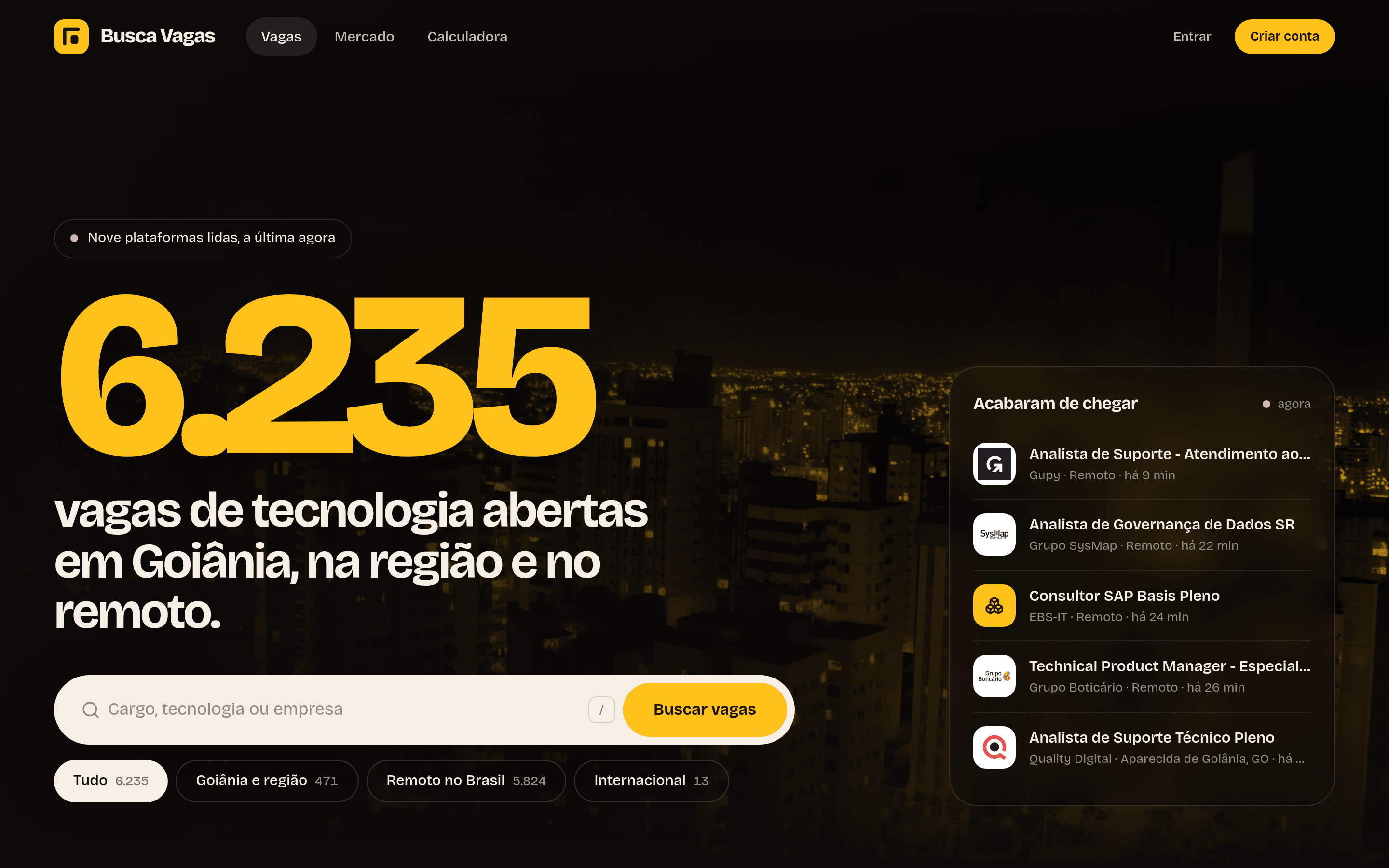
A crawler reads nine job boards, merges the same job posted in different places and makes everything searchable, with filters and a link to the original posting.

No AI, on purpose: clear rules, explainable results and zero model cost.

How it works

  1. Collect
  2. Clean up
  3. Search
  4. Site
  • Next.js
  • Fastify
  • PostgreSQL
  • GSAP
  • Vitest
Busca Vagas home page: the total number of jobs in huge type over a photo of Goiânia at night
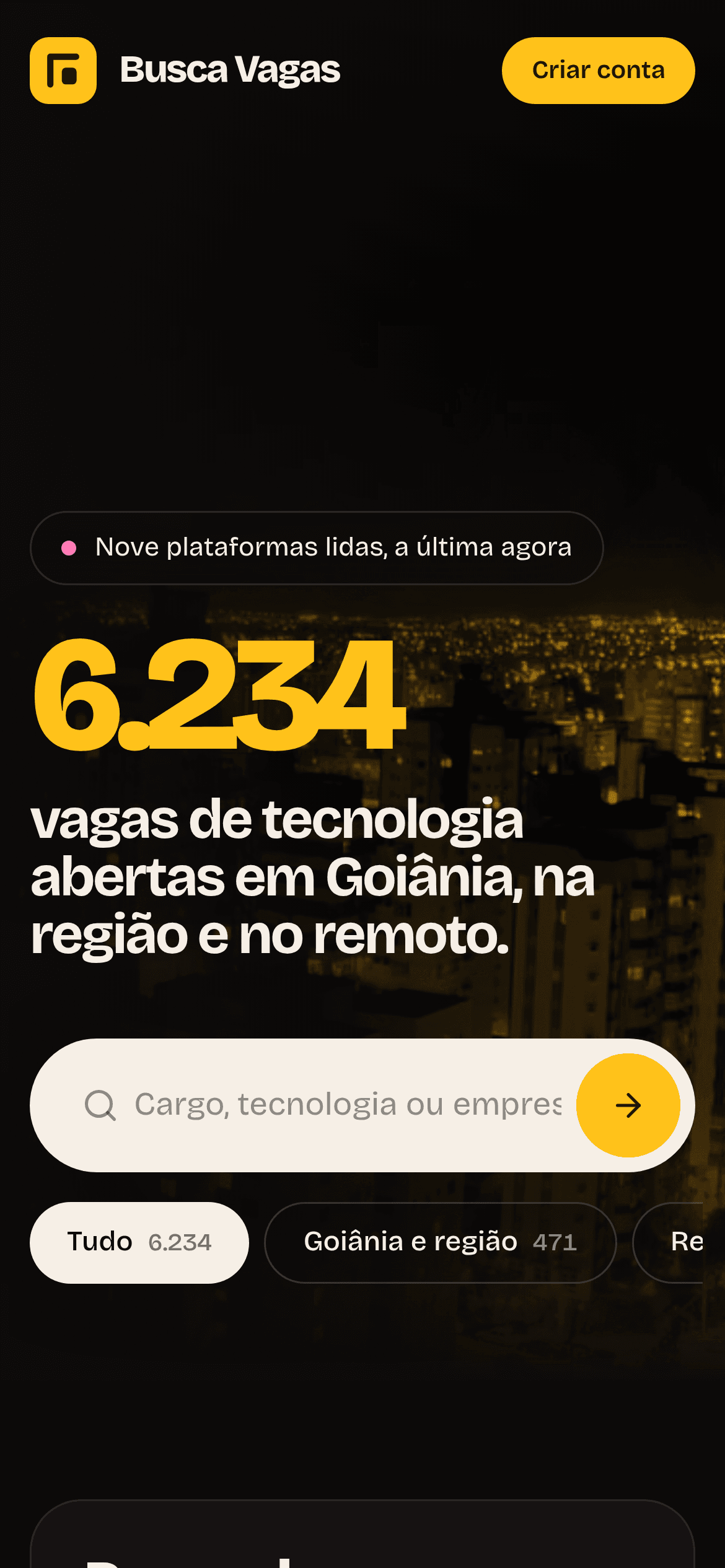
Busca Vagas on a phone

It's also how I keep track of openings.
02Tenaz

No customer left hanging.

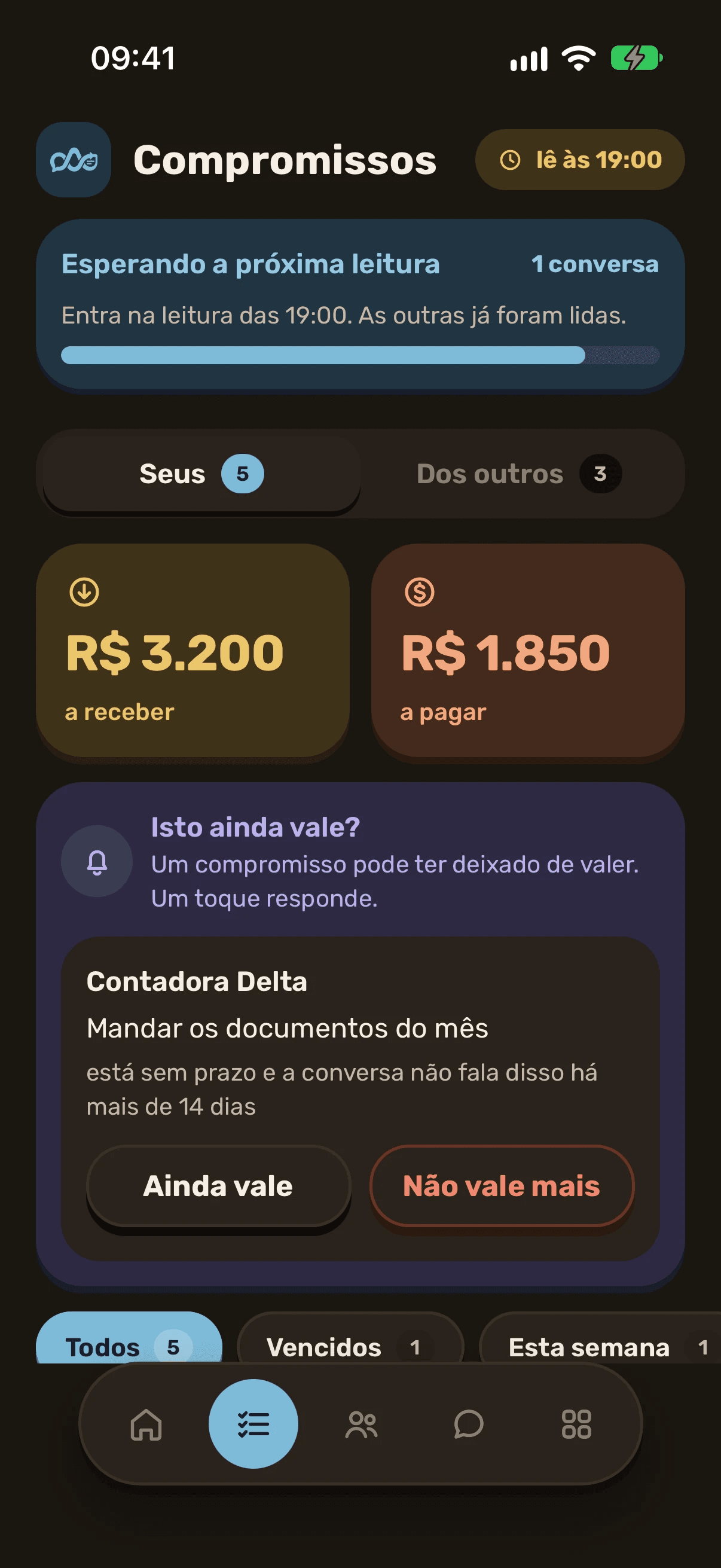
An app that reads the WhatsApp conversations of people who sell and keeps a list of what they promised, what's expected of them and what no longer matters.

The AI only reads; it never replies for you. Three rounds a day with Claude, a queue in PostgreSQL and old conversations archived as Parquet.

How it works

  1. A message arrives
  2. Audio becomes text
  3. The round
  4. The check
  • React Native
  • Expo
  • Express
  • Graphile Worker
  • Claude
Commitments screen in dark mode: what is due to be received and paid, and a question on whether an old commitment still stands
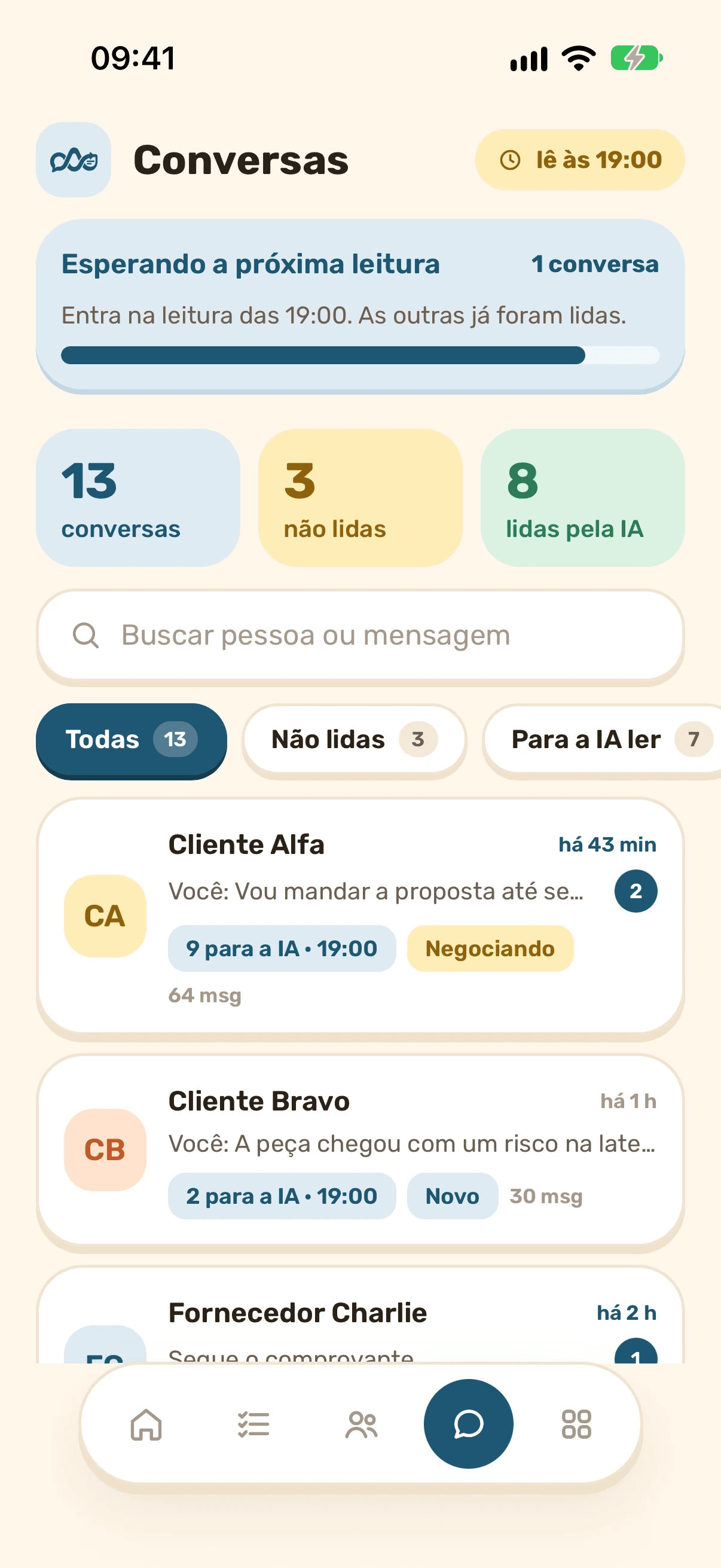
Conversations screen: the test account's customers, with what is still unread and the stage of each deal
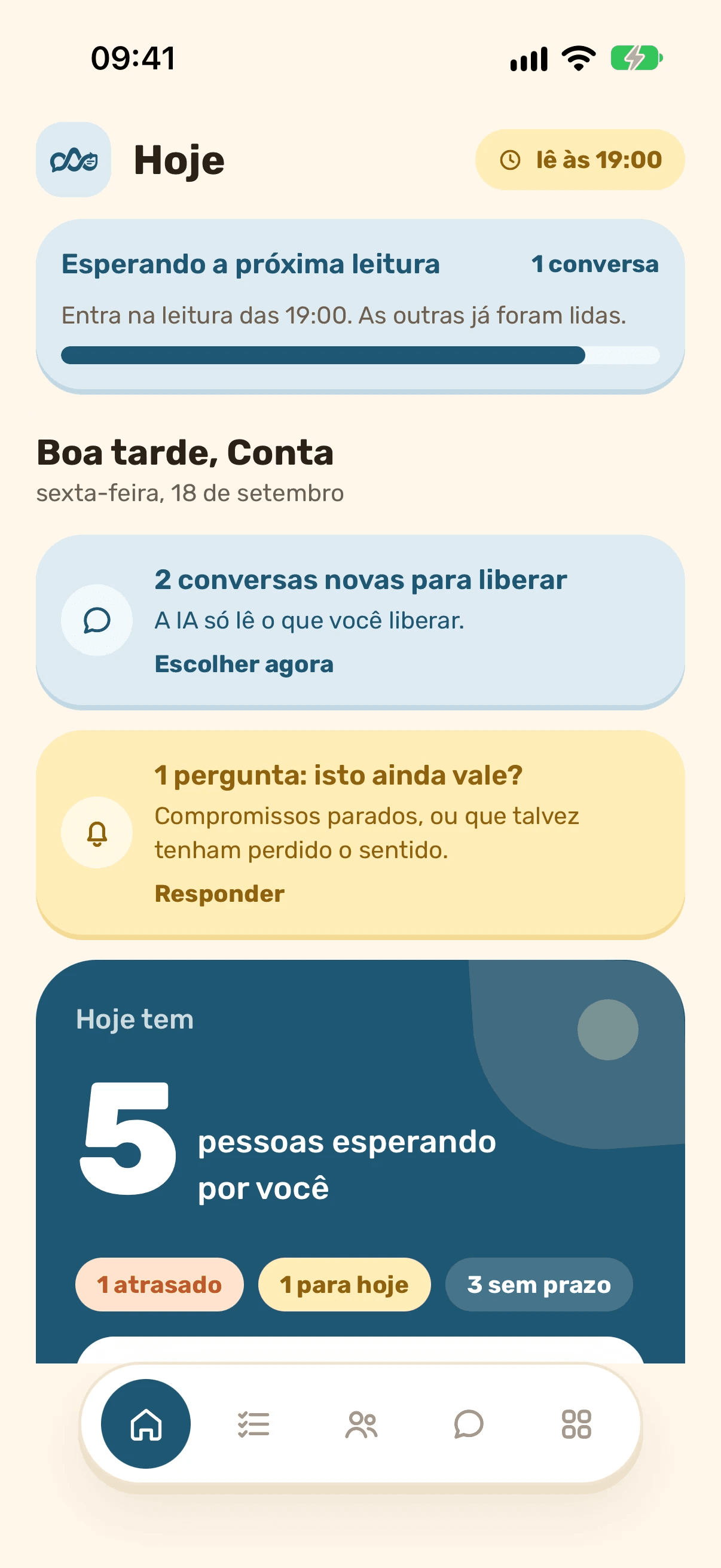
Tenaz Today screen: two new conversations to approve, a question about a stalled commitment and five people waiting for an answer

Real screens from the app, on the test account.

03POS

A checkout that keeps going when the internet drops.

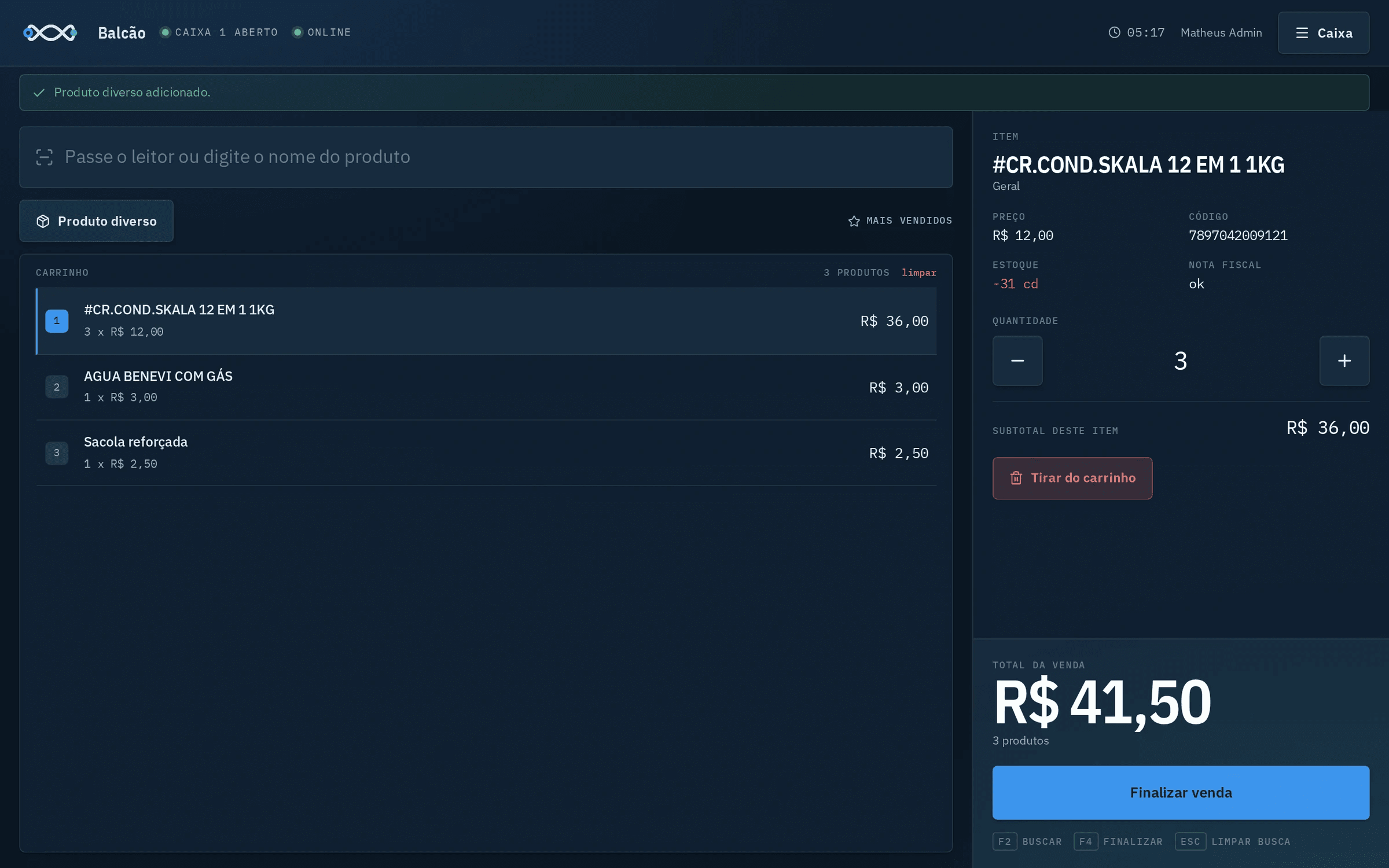
Sales, store credit, inventory and electronic invoices issued straight to the tax authority (SEFAZ), with the counter connected to the server over a VPN I set up.

From printer technician to the system that prints the tax receipt.

How it works

  1. At the counter
  2. On the server
  3. At SEFAZ
  4. The path
  • React
  • Express
  • Prisma
  • PostgreSQL
  • NFC-e
  • WireGuard
POS counter with three products in the cart, the details of the selected item and a total of R$ 41.50
Sale of R$ 41.50 recorded, with the choice between a non-fiscal receipt and an electronic tax invoice

Real counter screens, in use at a store.

04Vertizia

Where social media managers prove their work.

It started as a web platform with a team of image agents: one creates the scene, one fixes light and color, one writes the caption and a critic rejects whatever isn't good enough.

After measuring real usage, I changed course: it became a mobile app, with no AI. Changing your mind with data in hand is part of the job too.

How it works

  1. Generate
  2. Edit
  3. Caption
  4. Critique
  • NestJS
  • Next.js
  • Prisma
  • Satori
  • Expo
  • Fastify
Post generated by Vertizia for a fictional business

Posts for fictional businesses, generated by the first version.

Beyond the highlights.

Smaller products, infrastructure, client work, open source and study projects. Client work comes in an envelope, without the name of whoever hired me.

Where it all runs.

It's not a single server. It's a small network of machines I built and maintain, connected over VPN, each with its own role.

Production

Cloud

Linux with Docker and systemd: sites, APIs, queues, databases and the AI agents.

  • HTTPS everywhere
  • services that restart on their own
  • databases on the internal network only

Builds and tests

Home

A headless Mac Mini, reachable only over the VPN. It builds the iPhone app and served as a bench for running AI locally.

  • iOS builds with no queue
  • Xcode without a screen
  • key-only access

Edge

Store

The counter computer, which keeps selling offline and syncs with the cloud through its own tunnel.

  • offline checkout
  • its own VPN
  • remote support

Operations

Workstation

Where I run everything from, over SSH and VPN, with keys and no passwords.

  • key-only SSH
  • nothing exposed to the internet
  • home VPN

WireGuard VPN

  1. Service by service
  2. Table by table
  3. Screen by screen
  4. Only then, shut the old one down

Switching servers without losing a thing.

During a hosting provider switch, I migrated system by system and checked everything on the destination before shutting the old one down. No data was lost.

Before that, at the consultancy, I looked after production K3s clusters for clients.

See how I built it

From cable to click.

I started with network cables and worked my way up. Today I work across every layer of a system, from the server to the screen.

  1. AI

    Claude (API and agents) · OpenAI · Whisper · MCP · rembg and sharp

    Where I used itTenaz, Vertizia and the agents that run the servers

  2. Interface and app

    React · Next.js · Astro · React Native · Expo · Tailwind · GSAP

    Where I used itsites, dashboards and apps

  3. Back end

    Node.js · TypeScript · Fastify · Express · NestJS · Python · C# and ASP.NET Core

    Where I used itthe APIs of every product

  4. Data

    PostgreSQL · RLS · queues in the database · Portuguese full-text search · Redis · Prisma · DuckDB · Parquet

    Where I used itBusca Vagas, Tenaz, Vertizia and the finance system

  5. Containers

    Docker · Docker Compose · Kubernetes (K3s) · containerd

    Where I used itproduction and consultancy clients

  6. Operating system

    Linux · Headless macOS · systemd · Bash · cron

    Where I used itthe servers and the build Mac

  7. Network and security

    WireGuard · nginx · iptables and ufw · Let's Encrypt · Cloudflare · Key-only SSH

    Where I used itthe projects' VPNs and domains

  8. Field and local network

    Hardware · Cabling · Thermal printers · Zabbix · Support

    Where I used itJS Peças and Dimex

How I work.

No mystery: a way of working that repeats on every project and leaves a trail.

  1. Investigate before writing

    I read what already exists, test the sources and write down what I found in an investigation document.

    01-investigation.md

  2. Plan in blocks

    I split the work into small blocks, each with a deliverable and a definition of done, and align before starting.

    02-plan-in-blocks.md

  3. Build where it will run

    Code, tests and builds run on the server where the system will live. No works-on-my-machine.

    npm run build

  4. Check by looking

    Click-through scripts, an accessibility audit and a screenshot of every screen before I say it's done.

    quality.mjs

  5. Document every block

    Every block ends with a document and a commit. Whoever comes next understands the why, not just the what.

    docs/blocks/

  6. Run it afterwards

    Services with automatic restart, an alarm when what should come in stops coming in, and fixes when needed.

    systemctl status

Before I say done.

The list I go through on every delivery. Each line exists because one day it was missing.

  • The build passes on the server where the system will run.
  • Tests pass, including with data in the old format.
  • Every screen was opened and looked at, on desktop and on a phone.
  • The accessibility audit reports nothing.
  • Links respond, internal and external.
  • No secret and no personal data went into the repository.
  • After deploying, the service log shows no errors.
  • The block's document is written, and the commit, pushed.

Let's talk.

I'm looking for a remote or hybrid role. I reply fast.